What is on?
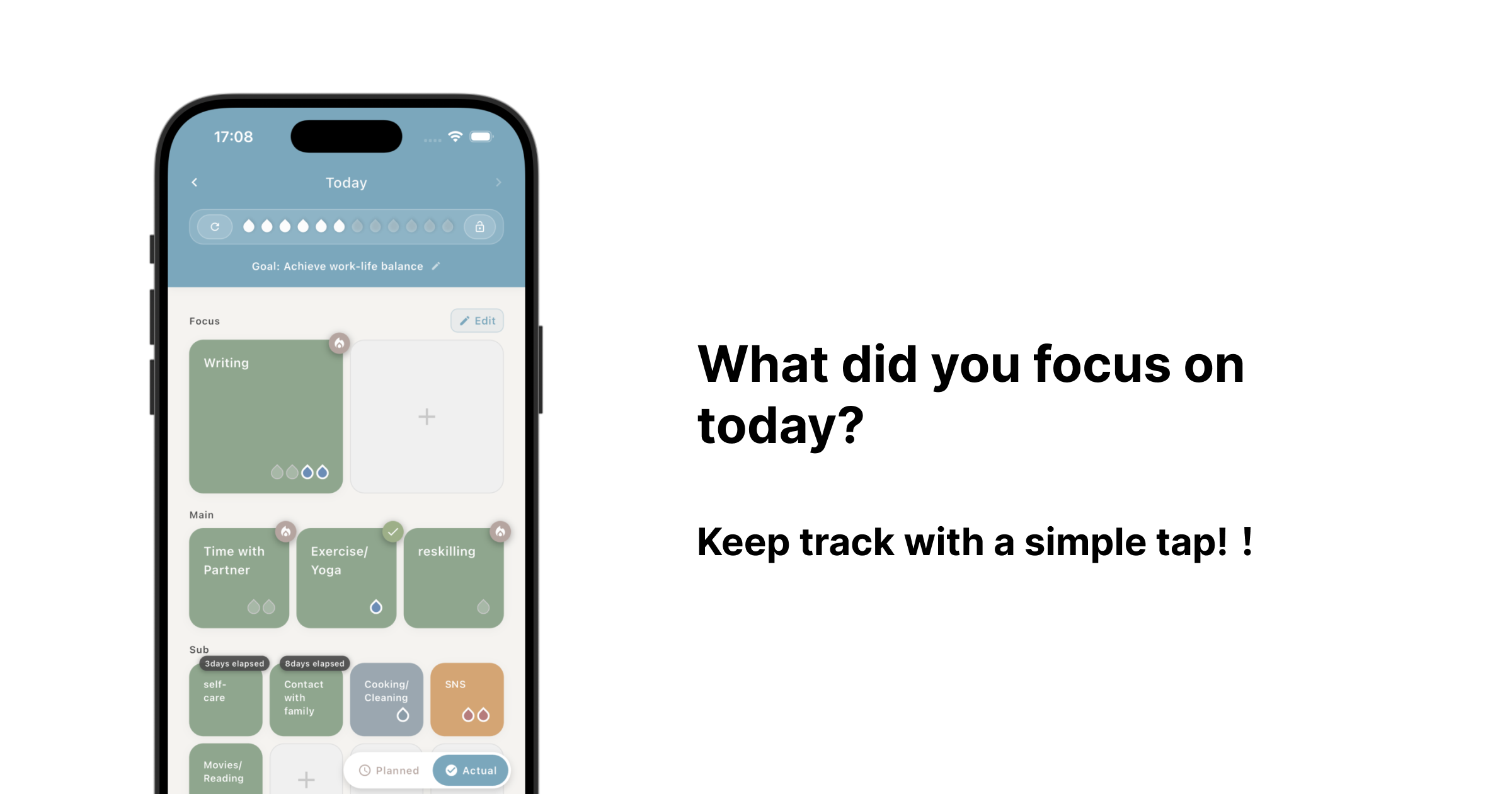
on is an “energy management” application that visualizes your daily energy distribution and helps you get closer to your ideal life.
Time and energy are limited resources. By using 12 drops to record where you spent your energy, you can achieve better resource management.
Basic Concepts
1. 12 Drops
Your daily energy is represented by 12 water drops. This is the total amount of energy you have available for the day.
2. Activity Tiles
- Important activities are placed on large tiles
- Routine activities are placed on small tiles
- Visually manage priorities through tile sizes
3. Energy Allocation
Tap tiles to place drops and record your activities.
How to Use the Home Screen
The home screen is the main interface of the app.
Drop Area
The 12 blue water drops at the top represent your daily energy.
Tile Types
Focus (Extra Large Tiles)
- Place your most important activities
- Set what you want to focus on most for achieving your goals
- Maximum 2 slots
Main (Large Tiles)
- Place high-priority activities
- Set things you want to work on regularly
- Maximum 3 slots
Sub (Medium Tiles)
- Place activities of moderate importance
- Place activities you want to balance or habits you want to quit
- Maximum 8 slots
Other (Small Tiles)
- Place routine activities or energy drains
- For recording minor activities
- No upper limit on slots
Plan/Record Mode
Toggle between Plan Mode and Record Mode using the button in the bottom right.
Plan Mode (🕐)
- Pre-plan what you want to do that day
- Set your plans in the morning
- Design your ideal energy allocation
Record Mode (✅)
- Record activities you actually did
- Record while reflecting at the end of the day
- Track actual energy usage
Comment Feature (ver 2.0.0)
You can leave comments about your reflections and insights for the day.
Examples of what to record:
- Reasons why drops were left unused
- Activities where you were particularly focused
- Points for improvement
- Daily insights and thoughts
Report Feature
The report screen allows you to review your weekly activity status.
This Week’s Status
- Number of drops used
- Surplus drops
- Activity count overview
- Usage rate and goal achievement rate
Category Breakdown
- Positive: Activities toward goal achievement
- Neutral: Routine activities
- Negative: Energy drains
Check your allocation balance and work toward your ideal distribution.
Weekly Message
Displays advice based on your activity status.
Tips for Effective Use
Daily Usage
- Morning: Plan using Plan Mode
- Evening: Reflect using Record Mode
- Place important activities on larger tiles
Building Habits
- It’s said that forming habits takes 21 days
- Small accumulations lead to big results
- Continue within reasonable limits
- Focus on consistency over perfection
Regular Review
- Check reports once a week
- Record insights in comments
- Be conscious of monthly changes
Activity Setup Tips
- Put goal-related activities in Focus tiles
- Put habits you want to build in Main tiles
- Honestly record energy drains too
- Leave drops unused if you couldn’t use all your energy
- Use specific and measurable activity names
Points for Habit Improvement Using on
When Drops Remain Unused
- Your plans may be unrealistic
- Try recording activities in more detail
- Record rest time as an activity too
When There Are Many Negative Activities
- Start by understanding your current situation
- Gradually increase positive activities
- Prepare alternative activities
When Continuation is Difficult
- Lower the barrier to recording
- Don’t aim for perfection
- Accumulate small successes
Finally
By recording your daily energy allocation, you can move closer to your ideal life!
on supports you in directing your time and energy toward more valuable pursuits. Consistency is most important. Start with small changes and build your ideal lifestyle.